In this snippet we will learn how the SSR (Server Side Rendering) technique works in React.js with a simple example using a node server.
This article just to illustrates how the SSR implemented in React.js frameworks like Next.js but building a full SSR engine requires a lot of things which is why the full featured frameworks like Next.js exist.
To implement SSR in a React.js application we will use Nodejs as our backend with Express and Vite.
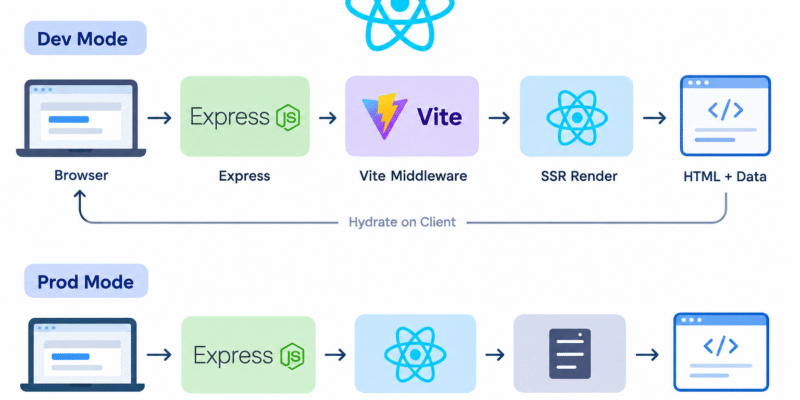
The basic architecture is:
Browser
   │
   │ GET /products/123
   ▼
Node.js / Express
   │
   ├── Fetch data from API / database
   │
   ├── Render React → HTML
   │
   └── Send HTML + JS bundle
   ▼
Browser
   │
   └── React hydrates the HTML
The important distinction is that React itself provides the rendering APIs, while Next.js normally gives you the entire SSR framework around them.
Project Structure
Let’s prepare a project structure like this:
my-app/
├── src/
│   ├── App.jsx
│   ├── entry-client.jsx
│   └── entry-server.jsx
│
├── server/
│   └── index.js
│
├── public/
│   └── ...
----index.html
├── package.json
└── vite.config.js
Install the packages
npm install react react-dom express
npm install -D vite @vitejs/plugin-react
vite.config.js
import { defineConfig } from 'vite';
import react from '@vitejs/plugin-react';

export default defineConfig({
    plugins: [
        react(),
    ],
});
The plugin-react is added to vite.config.js
index.html
<!doctype html>
<html lang="en">
<head>
    <meta charset="UTF-8" />

    <meta
            name="viewport"
            content="width=device-width, initial-scale=1.0"
    />

    <title>React SSR</title>
</head>

<body>

<div id="root"></div>

<script
        type="module"
        src="/src/entry-client.jsx">
</script>

</body>
</html>
React Application
Update the src/App.jsx with this:
import React from "react";

export default function App({ data }) {
    return (
        <div>
            <h1>{data.title}</h1>

            <p>{data.description}</p>
        </div>
    );
}
Server-side entry
Next update the src/entry-server.jsx
import React from "react";
import { renderToString } from "react-dom/server";
import App from "./App";

export function render(data) {
    return renderToString(
        <App data={data} />
    );
}
With this code we tell React how to render the application on the server.
The important API is renderToString() which takes:
<App data={data} />
and produces an html like this:
<div>
    <h1>Product Name</h1>
    <p>Product description</p>
</div>
renderToString renders a React tree to an HTML string.
const html = renderToString(reactNode, options?)
Learn more about renderToString in the React.js docs.
Client-side entry
The browser then needs to “take over” that HTML.
This process called “hydration“.
src/entry-client.jsx
import React from "react";
import { hydrateRoot } from "react-dom/client";

import App from "./App";

const data = window.__INITIAL_DATA__;

hydrateRoot(
    document.getElementById("root"),
    <App data={data} />
);
hydrateRoot lets you display React components inside a browser DOM node whose HTML content was previously generated by react-dom/server.
Node.js Server
Now create an express server.
Open server/index.js
import express from "express";
import path from 'node:path';
import { fileURLToPath } from 'node:url';
import fs from 'node:fs/promises';
import { createServer as createViteServer } from 'vite';

const __filename = fileURLToPath(import.meta.url);
const __dirname = path.dirname(__filename);


const app = express();

const isProduction = process.env.NODE_ENV === 'production';

async function createServer() {
    let vite;

    if (!isProduction) {
        // Create Vite in middleware mode.
        vite = await createViteServer({ server:
                {
                    middlewareMode: true,
                },
            appType: 'custom',
        });

        app.use(vite.middlewares);
    } else {
        // Production: serve the compiled client files.
        const clientPath = path.resolve( __dirname, '../dist/client' );

        app.use(express.static(clientPath));
    }

    app.get("{*splat}", async (req, res, next) => {

        try {
            const url = req.originalUrl;

            let template;
            let render;

            if (!isProduction) {
                // Read the source index.html
                template = await fs.readFile(
                    path.resolve(__dirname, '../index.html'),
                    'utf-8'
                );

                // Load the SSR entry through Vite.
                const ssrModule = await vite.ssrLoadModule( '/src/entry-server.jsx' );

                render = ssrModule.render;

                // Vite transform the html
                template = await vite.transformIndexHtml( url, template );
            } else {
                // In production we use the generated html
                template = await fs.readFile(
                    path.resolve( __dirname, '../dist/client/index.html' ),
                    'utf-8'
                );

                const ssrModule = await import( '../dist/server/entry-server.js' );

                render = ssrModule.render;
            }
            const data = {
                title: "My Product",
                description: "This product was loaded on the server."
            };

            // Render react on the server
            const appHtml = render(data);

            // Inject SSR HTML into #root.
            template = template.replace(
                '<div id="root"></div>',
                `<div id="root">${appHtml}</div>`
            );

            const initialData = JSON.stringify(data).replace(/</g, '\\u003c');

            template = template.replace(
                '</head>',
                ` <script> window.__INITIAL_DATA__ = ${initialData}; </script> </head> `
            );

            res.status(200).set({
                'Content-Type': 'text/html',
            })
                .end(template);
        } catch (error) {
            if (vite) {
                vite.ssrFixStacktrace(error);
            }

            next(error);
        }
    });

    app.listen(3000, () => {
        console.log("Server running on http://localhost:3000");
    });
}

createServer();
The Express server is essentially the bridge between the browser, your backend/API, and React SSR.
This server works for both development and production. At first i imported some needed packages: express, path, fs, node:url, createServer from vite.
Why we use the createServer from vite, this is to be used in development mode, while in production we use express.
I declared an async function to create the server:
async function createServer()
Inside the createServer() function, i checked for the environment if not isProduction, in that case we create a vite server:
vite = await createViteServer({ server:
                {
                    middlewareMode: true,
                },
            appType: 'custom',
        });
And then using the vite.middlewares. Else we use the express.static middleware which looks into the generated dist/client/ directory:
const clientPath = path.resolve( __dirname, '../dist/client' );

app.use(express.static(clientPath));
It tells express: If the browser requests a static file, look inside dist/client.
Then we declared a catch-all route:
app.get("{*splat}", async (req, res, next) => {

});
Which means for every incoming request this handler will render the React application on the server.
For example:
GET /
GET /products
GET /products/123
GET /about
Can eventually be handled by the react-router.
Inside the catch-all route, again we check for the environment, if we are in dev, we read the contents of index.html file and then using vite.ssrLoadModule to access the react render function from “src/entry-server.jsx“:
template = await fs.readFile(
                    path.resolve(__dirname, '../index.html'),
                    'utf-8'
                );

 // Load the SSR entry through Vite.
 const ssrModule = await vite.ssrLoadModule( '/src/entry-server.jsx' );

 render = ssrModule.render;
If we are in production, we do a similar thing, we read the template from the generated dist/client/index.html. Next we retrieve the render function from from dist/server/entry-server.js:
template = await fs.readFile(
                    path.resolve( __dirname, '../dist/client/index.html' ),
                    'utf-8'
                );

const ssrModule = await import( '../dist/server/entry-server.js' );

render = ssrModule.render;
Now we have the template and the render function, apply the render to the template, make a replacement of the main holder div #root and send the response:
const appHtml = render(data);

            // Inject SSR HTML into #root.
template = template.replace(
                '<div id="root"></div>',
                `<div id="root">${appHtml}</div>`
 );

...
...
res.status(200).set({
                'Content-Type': 'text/html',
            })
                .end(template);
To test this, modify the package.json scripts and set the type: “module“:
{
   "type": "module",
  "scripts": {
    "dev": "NODE_ENV=development node server/index.js",
    "build:client": "vite build --outDir dist/client",
    "build:server": "vite build --outDir dist/server --ssr src/entry-server.jsx",
    "build": "npm run build:client && npm run build:server",
    "start": "NODE_ENV=production node server/index.js"
  },

   ...
}
Now open three terminals and run:
npm run build:client
For building client
npm run build:server
For building server
and launch the app with:
npm run dev
Navigate to the browser and open http://localhost:3000 you will see the generated html.