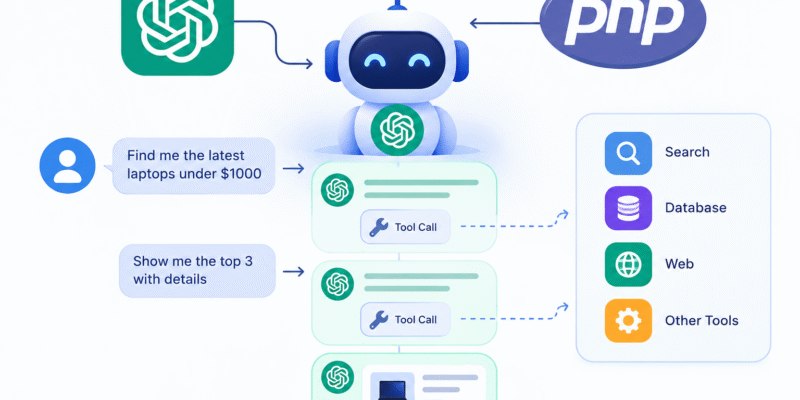
Modern AI applications are moving beyond the traditional “send prompt → receive answer” model.
A useful AI agent needs to remember what the user said, understand the current task, decide when it needs external data, call application functions, inspect their results, and then continue the conversation.
For example, imagine a real-estate assistant:
User: Find apartments in Alexandria under 3 million EGP.
Agent: searches the application’s property database.
User: Only show apartments with 3 bedrooms.
Agent: remembers that the user is still talking about the previous search and applies the additional constraint.
User: Show me the cheapest one.
Agent: uses the previous search context and retrieves the cheapest matching property.
This article explains how to build that architecture in PHP, including the important distinction between the LLM’s reasoning, conversation state, and your application’s tools.
What Is a Multi-Turn AI Agent?
A basic LLM integration looks like this:
User
  ↓
PHP Application
  ↓
OpenAI API
  ↓
AI Response
Every request is essentially independent unless you explicitly provide previous messages. A multi-turn agent looks more like:
                 ┌─────────────────────┐
                 │     PHP Backend     │
                 │                     │
User ───────────►│ Conversation State  │
                 │        │            │
                 │        ▼            │
                 │    OpenAI API       │
                 │        │            │
                 │        ▼            │
                 │    Tool Decision    │
                 │        │            │
                 │        ▼            │
                 │   Tool Dispatcher   │
                 │        │            │
                 │   ┌────┴─────┐      │
                 │   ▼          ▼      │
                 │ Database   External │
                 │ APIs       Services │
                 └─────────────────────┘
The important part is that OpenAI does not directly execute your PHP functions. Instead, the model tells your application:
“I want to call search_properties with these arguments.”
Your PHP application executes the function and sends the result back to the model. The model can then continue generating the final response.
Tool Calling Is Not Function Execution
This is fundamental in LLM.
Suppose we define:
function searchProperties(
    string $city,
    ?int $maxPrice = null,
    ?int $bedrooms = null
) {
    // Query database...
}
The OpenAI model doesn’t execute this function. Instead, you expose its description to the model.
Conceptually:
{
    "name": "search_properties",
    "description": "Search available properties",
    "parameters": {
        "type": "object",
        "properties": {
            "city": {
                "type": "string"
            },
            "max_price": {
                "type": "integer"
            },
            "bedrooms": {
                "type": "integer"
            }
        },
        "required": ["city"]
    }
}
The model might respond with something similar to:
{
    "name": "search_properties",
    "arguments": {
        "city": "Alexandria",
        "max_price": 3000000,
        "bedrooms": 3
    }
}
Your application receives this request and executes:
$properties = searchProperties(
    city: 'Alexandria',
    maxPrice: 3000000,
    bedrooms: 3
);
We pass the result back to OpenAI.
So typical structure flow like this:
LLM
 │
 │ "Call search_properties"
 ▼
PHP
 │
 │ Execute actual function
 ▼
Database
 │
 │ Results
 ▼
PHP
 │
 │ Tool result
 ▼
LLM
 │
 │ Natural-language response
 ▼
User
This separation is what makes tool calling safe and controllable.
Multi-Turn Conversations Are More Interesting
Tool calling becomes significantly more useful when combined with conversation state.
Turn 1
User:
Find apartments in Alexandria under 3 million.
The agent calls:
search_properties(
    city="Alexandria",
    max_price=3000000
)
Turn 2
User:
Only 3 bedrooms.
The user didn’t repeat:
Alexandria
under 3 million
The agent should understand that the new request modifies the previous search.
Turn 3
User:
Which one is cheapest?
The agent should understand:
“Which one” = apartments from the previous search.
This requires maintaining conversation state.
OpenAI’s current API ecosystem includes the Responses API and Conversations API for managing this kind of interaction, and current PHP clients expose both resources.
Choosing the OpenAI API
For a new agent implementation, it is better to build around the Responses API rather than starting a new project around the older Assistants API.
The community-maintained OpenAI PHP client currently exposes:
$client->responses()
As well as:
$client->conversations()
For example:
$response = $client->responses()->create([
    'model' => 'gpt-5.6-luna',
    'input' => 'Hello',
]);
The exact model should be chosen according to your application’s quality, latency, and cost requirements. OpenAI currently lists different GPT-5.6 models for different workload characteristics.
Installing OpenAI PHP
For a framework-independent PHP application:
composer require openai-php/client
The package requires PHP 8.2+ according to the documentation.
For laravel:
composer require openai-php/laravel
Then:
php artisan openai:install
The Laravel package provides an OpenAI facade and configuration through environment variables.
For example:
OPENAI_API_KEY=sk-...
Then:
use OpenAI\Laravel\Facades\OpenAI;

$response = OpenAI::responses()->create([
    'model' => 'gpt-5.6-luna',
    'input' => 'Hello',
]);

return $response->outputText;
There is also the Laravel AI ADK and Prism-ai packages.
Designing the Agent
A good starting point is to design the agent using dedicated service classes similar to this structure:
Agent
 │
 ├── ConversationManager
 │
 ├── OpenAIClient
 │
 ├── ToolRegistry
 │      ├── SearchPropertiesTool
 │      ├── GetPropertyTool
 │      ├── CreateViewingTool
 │      └── ...
 │
 └── ToolExecutor
For example:
app/
├── AI/
│   ├── Agent.php
│   ├── ConversationManager.php
│   ├── ToolRegistry.php
│   └── Tools/
│       ├── SearchProperties.php
│       ├── GetProperty.php
│       └── CreateViewing.php
Defining a Tool
Each tool will become a class:
final class SearchProperties
{
    public function execute(array $arguments): array
    {
        $query = Property::query()
            ->where('city', $arguments['city']);

        if (isset($arguments['max_price'])) {
            $query->where('price', '<=', $arguments['max_price']);
        }

        if (isset($arguments['bedrooms'])) {
            $query->where(
                'bedrooms',
                $arguments['bedrooms']
            );
        }

        return $query
            ->limit(20)
            ->get()
            ->toArray();
    }
}
But the model also needs a schema describing this tool.
For example:
final class SearchProperties
{
    public static function definition(): array
    {
        return [
            'type' => 'function',
            'name' => 'search_properties',
            'description' =>
                'Search available properties using location, price and bedroom filters.',
            'parameters' => [
                'type' => 'object',
                'properties' => [
                    'city' => [
                        'type' => 'string',
                        'description' => 'City where the property is located',
                    ],
                    'max_price' => [
                        'type' => 'integer',
                        'description' => 'Maximum property price',
                    ],
                    'bedrooms' => [
                        'type' => 'integer',
                        'description' => 'Number of bedrooms',
                    ],
                ],
                'required' => ['city'],
                'additionalProperties' => false,
            ],
        ];
    }
}
There are two separate things:
Tool definition
Tells the model: What can you call?
Tool implementation
Tells PHP: What actually happens when it is called?
The Tool Registry
Rather than hard coding tool logic into the agent:
final class ToolRegistry
{
    public function definitions(): array
    {
        return [
            SearchProperties::definition(),
            GetProperty::definition(),
            CreateViewing::definition(),
        ];
    }

    public function execute(
        string $name,
        array $arguments
    ): mixed {
        return match ($name) {
            'search_properties'
                => app(SearchProperties::class)
                    ->execute($arguments),

            'get_property'
                => app(GetProperty::class)
                    ->execute($arguments),

            'create_viewing'
                => app(CreateViewing::class)
                    ->execute($arguments),

            default => throw new RuntimeException(
                "Unknown tool: {$name}"
            ),
        };
    }
}
This gives us a central tool router.
The Agent Loop
Multi-turn agents uses the agent loop which you can think of as an infinite loop.
In simple terms:
while (true) {

    $response = askOpenAI();

    if ($responseContainsToolCalls($response)) {

        foreach ($response->toolCalls as $toolCall) {

            $result = executeTool($toolCall);

            addToolResult($result);
        }

        continue;
    }

    return $response;
}
The loop is extremely important.
Why?
Because a model can require multiple tool calls before it can answer.
For example:
User:
Find the cheapest 3-bedroom apartment in Alexandria and tell
me whether it is near the airport.
The model might do:
search_properties()
       ↓
get_property()
       ↓
calculate_distance()
       ↓
final answer
A Simplified PHP Agent
A simplified architecture might look like this:
final class Agent
{
    public function __construct(
        private $openai,
        private ToolRegistry $tools,
    ) {}

    public function run(
        string $conversationId,
        string $message
    ): string {

        $response = $this->openai
            ->responses()
            ->create([
                'model' => 'gpt-5.6-luna',

                'input' => [
                    [
                        'role' => 'user',
                        'content' => $message,
                    ],
                ],

                'tools' => $this->tools->definitions(),
            ]);

        while ($this->hasToolCalls($response)) {

            $toolOutputs = [];

            foreach ($this->getToolCalls($response) as $call) {

                $arguments = json_decode(
                    $call->arguments,
                    true,
                    512,
                    JSON_THROW_ON_ERROR
                );

                $result = $this->tools->execute(
                    $call->name,
                    $arguments
                );

                $toolOutputs[] = [
                    'type' => 'function_call_output',
                    'call_id' => $call->callId,
                    'output' => json_encode($result),
                ];
            }

            $response = $this->openai
                ->responses()
                ->create([
                    'model' => 'gpt-5.6-luna',
                    'input' => $toolOutputs,
                ]);
        }

        return $response->outputText;
    }
}
The exact response object properties depend on the PHP SDK version, so production code should follow the SDK’s current Responses resource representation rather than assuming a Chat Completions-style structure.
Maintaining Conversation State
The agent needs to know what happened during previous turns.
There are multiple broad approaches:
Approach A — Store the conversation in DB
Your database could contain:
conversations
----------------
id
user_id
title
created_at
and:
messages
----------------
id
conversation_id
role
content
created_at
For example:
Conversation #52

User:
Find apartments in Alexandria under 3 million.

Assistant:
I found 24 properties...

User:
Only 3 bedrooms.

Assistant:
There are 7 matching properties...
Your application reconstructs the required context for each request. This approach gives you maximum control.
Approach B — Use OpenAI Conversation State
OpenAI also provides conversation state through the Conversations API. The current PHP client exposes:
$client->conversations()
alongside Responses API.
For example:
$response = $this->openai
            ->responses()
            ->create([
                'model' => 'gpt-5.6-luna',
                'input' => [
                    [
                        'role' => 'user',
                        'content' => $message,
                    ],
                ],
                'tools' => $this->tools->definitions(),
                'conversation' => $conversation->id
            ]);
As you see we pass the conversation parameter to Openai. Then store the conversation id in DB along the conversation data:
Your DB
   │
   ├── user_id
   ├── application data
   └── conversation_id
                │
                ▼
        OpenAI Conversation
                │
                ├── Turn 1
                ├── Turn 2
                ├── Tool call
                ├── Tool result
                └── Turn 3
Approach C — Passing context from the previous response
Another way to manage conversation state is to share context across generated responses with the previous_response_id parameter. You can retrieve this parameter from OpenAI response, store it in DB and then append it in later messages.
$firstResponse = $this->openai
            ->responses()
            ->create([
                'model' => 'gpt-6-astra',
                'input' => [
                    [
                        'role' => 'user',
                        'content' => $message,
                    ],
                ]
            ]);

$secondResponse = $this->openai
            ->responses()
            ->create([
                'model' => 'gpt-6-astra',
                'input' => [
                    [
                        'role' => 'user',
                        'content' => $message,
                    ],
                ],
                'previous_response_id' => $firstResponse->id
            ]);
Tool Calls should Be Stateless
One of the best architectural decisions you can make is to keep tools relatively stateless.
Instead of:
$agent->currentUser
$agent->currentProperty
$agent->previousSearch
Prefer:
execute(array $arguments)
and explicitly pass the application context:
final class ToolContext
{
    public function __construct(
        public readonly int $userId,
        public readonly int $organizationId,
    ) {}
}
Then:
public function execute(
    array $arguments,
    ToolContext $context
): array {
    return Property::query()
        ->where(
            'organization_id',
            $context->organizationId
        )
        ->where(
            'city',
            $arguments['city']
        )
        ->get()
        ->toArray();
}
This is much safer.
Tool Arguments Must be Validated
Never trust the arguments returned by LLM:
$arguments = json_decode(
    $call->arguments,
    true
);
This block should be followed by validation:
In laravel:
$validated = validator(
    $arguments,
    [
        'city' => ['required', 'string', 'max:100'],
        'max_price' => ['nullable', 'integer', 'min:0'],
        'bedrooms' => ['nullable', 'integer', 'min:1', 'max:20'],
    ]
)->validate();
Then:
$result = $tool->execute($validated);
The model is untrusted input source, therefore treat it’s tool arguments like HTTP Request Data.
Tools Can Be Read Or Write Operations
There are two important categories:
Read Tools like:
search_properties
get_property
get_customer
get_order
search_documents
get_inventory
Write Tools like:
create_order
cancel_order
send_email
create_booking
update_customer
delete_property
Write tools tend to be much dangerous, however don’t let the LLM have direct control over data store like DB, and you must add strict instructions to the LLM for write tools it must ask for confirmation.
For example:
interface AgentTool
{
    public function name(): string;

    public function definition(): array;

    public function execute(
        array $arguments,
        ToolContext $context
    ): mixed;

    public function requiresConfirmation(): bool;
}
Then:
public function requiresConfirmation(): bool
{
    return true;
}
For destructive operations.